
It’s that time of year when society has to pay back for what was stolen. That’s right, it’s the beginning of Daylight Savings in Australia. The clocks go forward an hour, the perfect sleep schedule you have only just finally gotten back into is ruined, and by the time you recover, you’ll have to do it all again in April when the clocks go back to their original time again.
Different countries and even different parts of countries will have their own rules with when Daylight Savings kicks in and how long it goes for. In Australia, Queensland, Western Australia, and the Northern Territory don’t have any DST adjustment at all, and Lord Howe Island curiously moves their clocks forward by only half an hour while the other five states move forward by a full hour. Australia is the only country to adjust their clocks on the first Sunday of October, but we’re pretty close to New Zealand who moves their clocks forward an hour on the last Sunday of September.
The missing hour
Regardless of where you are or when your clock changes, there’s still an interesting scenario to deal with; at some point you’ll have a certain time of the day that doesn’t exist on that one day, and inversely another time of year when you’ll have two of the exact same timestamp. In my case, the clocks will tick forward from 1:59:58am, to 1:59:59am, to 3:00:00am. So what happens when you try to schedule something to occur at 2:30:00am? What should happen at that time? And are users aware of this behaviour happening at all?
Reject a request for that time
The easiest way to deal with edge cases is to not deal with edge cases! Years ago I wrote a Discord bot that included a command that allowed users to set themselves scheduled reminders. A separate command set an account-wide timezone setting (either as a UTC offset or with an IANA name), which allows this reminder command to use the user’s configured timezone automatically when they specify a date and time. When an invalid time is provided, the bot rejects the command.
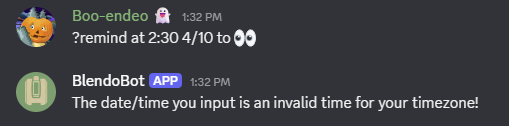 Here BlendoBot won’t accept the reminder command because 2:30am does not exist on October 4th for my
 Australia/Sydney timezone.
From a usability standpoint, this does remove all ambiguity around what should happen with the missing hour, but it also is restrictive without an explicit interface to handle this scenario. Since I don’t support inline timezone indications on this command, users have to work around this by setting their timezone in another command to UTC, set the reminder, and then change their timezone back. Alternatively they can set reminders that fire after a duration rather than at a specific time (e.g. they can say the reminder fires in 12:34:25 to say it’ll happen 12 hours, 34 minutes, and 25 seconds after the command is received), but that’s not fun for a casual user to figure out.
Add the offset
On Android (and some other alarm reminder sites I visited while writing this blog such as vclock.com), you can set an alarm on your device at a specific date and time. Setting a time for 2:30am will actually trigger the alarm at 3:30am. Any alarm that occurs during the missing hour will naturally occur as if there were no Daylight Savings at all by using the DST offset (in my case, an hour). I surveyed some of my friends and family, and I found that non-programmers would assume this behaviour to be the most correct one, which probably explains why these programs have been implemented this way (although it still tricks some people up when they see their alarm change before their eyes!).
This method does introduce an odd aspect to me though; alarms that are scheduled during the 2am hour will fire after alarms in the 3am hour. I’ve sometimes set up alarms with a specific order (such as setting up a second alarm 15 minutes after my first one to make sure I’ve woken up and not just dismissing the first alarm), but this breaks my assumption that alarm A always fires before alarm B! An alarm at 3:15am will play 15 minutes before an alarm at 2:30am. Depending on what you’re doing this may be quite confusing!
Skip it entirely
I remember an older alarm app I used would schedule times differently though; since there was no 2am, it decided that your 2:30am alarm should instead play at the next 2:30am, which would be the following Monday. While this does avoid the ordering clash of the above approach, you’ll naturally get a lot of people wondering why their alarms didn’t go off on this day.
Condense to 3am
This one is hypothetical; I haven’t seen it implemented before, but if you were concerned about the order of your alarms, one could fire every alarm that would’ve happened at 2am at the very first point in time possible, which would be 3:00:00am. This gets around the ordering concern I had earlier, and at least won’t skip the alarm on people who really need it, but you will have to deal with a constant barrage of alerts at exactly 3am, which may not be too useful.
To summarise
| Approach | Pros | Cons |
|---|---|---|
| Reject | ✅ No ambiguity around what behaviour you want. | ❌ Prohibits users from using the tool normally for scenarios like this. Explicit UIs or workarounds are needed. |
| Add | ✅ Alarms during the hour are correctly paced. ✅ Anecdotally what non-programmers expect. | ❌ Alarms at 3am will fire before alarms at 2:30am. |
| Skip | ✅ No ambiguity again. | ❌ You’ll be late for work on Sunday because no alarm will play! |
| Condense | ✅ All alarms will trigger at the soonest possible time, no alarms missed, none out of order. | ❌ Every alarm from 2:00am to 2:59am will fire at exactly the same second at 3:00am. 🔔 |
The duplicate hour
I won’t go too much into what happens at the other half of the year when there are two 2ams on a date since it’s a fairly different discussion and doesn’t have the same trade-offs. Obviously you can still reject requests that land on the duplicate hour, but users will still need to apply the timezone workarounds that you would’ve for the missing hour scenario. If you let users put alarms at 2am, then what happens when they want to put an alarm for the second 2am? How would they specify this? This feels like an interesting user interface issue that I don’t have a clear answer for.
One of my friends works in security, and there’s an interesting clause in their employment contract which states that their pay calculation is determined as if there were no Daylight Savings at all. If they work overnight when Daylight Savings starts, the shift is an hour shorter but they’re still paid for the hour that never existed. This comes back in April when they have to work the extra hour, but they’re okay with it because it simplifies how everyone handles these scenarios at the end of the day.
I rest my case
In practice, the reason why Daylight Savings is enacted between 2am and 3am is because it is the least likely time to affect most of the population. Scenarios like this don’t concern most people because they put their alarm on for 6:30am and blissfully wake up slightly more tired or rested when the extra hour is added or removed. For the most part, this only affects security guards, truck drivers, other nocturnal occupations, and software engineers and others who have to account for these interesting edge cases.
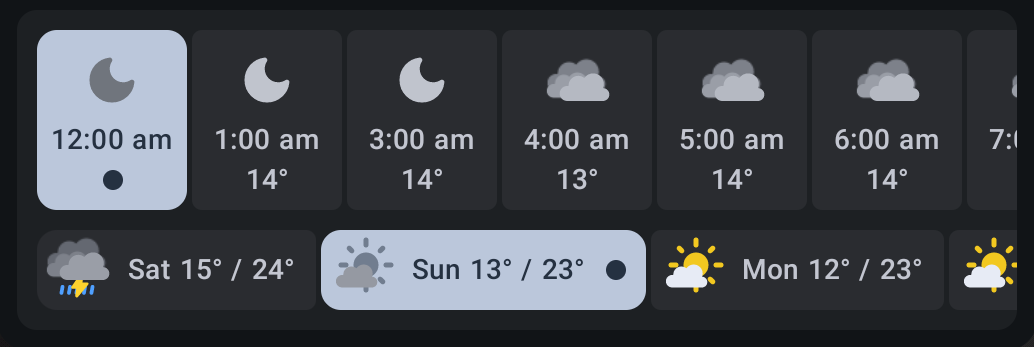 This is Breezy Weather, which correctly skips 2am in the hourly forecast.
It was interesting thinking about this problem though and realising that each solution requires some trade-off; whether it be ordered consistency, guaranteed delivery, noisiness, or just a lack of user interface, the right approach requires an understanding of your user interface and your audience. It’s only an edge case for two hours out of 8,760 in the whole year, but depending on what you’re working on and who your users are, this may be a rather important case to handle. For my BlendoBot program, an improvement I can make would be to allow an inline timezone definition to allow users to specify the time irrespective of their configured timezone when necessary. It’s small but effective for covering this scenario.
And for my non-programming lifestyle, I guess I’ll have to go to bed early to get that hour back.